REVIEW · SAN JOSE
Silicon Valley Self-Guided Driving Audio Tour for Tech Lovers
Book on Viator →Operated by Drive with Action · Bookable on Viator
Silicon Valley gets way more interesting with audio. This self-guided drive strings together hands-free stories across tech campuses, so you’re not just passing buildings—you’re learning why they mattered. I especially like the offline setup (no cell signal needed once downloaded) and the freedom to start, pause, and skip at your own pace. The main thing to watch: the audio timing depends on you following the route and speed, so navigation hiccups can make parts feel rushed or cut off.
You’ll cover roughly 38 miles, with 56+ audio stories, in about 2 to 4 hours. You start near Menlo Park and roll through the core Bay Area tech corridor, ending up at Stanford Stadium. You’ll also get a mix of true “tech place” moments and one real break at the Computer History Museum.
If your group includes both hardcore tech lovers and people who just want a fun rainy-day drive, this hits the sweet spot. Still, for the best experience, plan on a phone that can handle GPS, download the tour on strong Wi‑Fi, and ideally have a second person who can help with directions.
In This Review
- Key highlights you’ll feel right away
- How the audio tour works while you drive
- Price and value: $39.99 per group can make sense
- Route reality: 38 miles, 56+ stories, and a smooth pacing plan
- Stop 1: Meta HQ (formerly Facebook) at MPK 16
- Stop 2: Amazon Web Services at SJC18
- Stop 3: Google’s Android Lawn Statues
- Stop 4: Google B40 and the Googleplex experience
- Stop 5: Microsoft’s California HQ
- Stop 6: The Computer History Museum (real artifacts time)
- Stop 7: Apple Infinite Loop, the original campus drive
- Stop 8: Apple Park Visitor Center for a real break
- Stop 9: Tesla HQ and the Elon Musk storyline
- Navigation, lane timing, and why a copilot can help
- Tech requirements: phone, download, and car sound
- Who this tour is best for (and who should skip it)
- Should you book this Silicon Valley driving audio tour?
- FAQ
- How long is the Silicon Valley self-guided driving audio tour?
- What does the tour cost, and how many people can use it?
- Do I need cellular or Wi-Fi during the tour?
- Is the tour hands-free while driving?
- Can I start and pause the tour whenever I want?
- Where does the tour start and end?
- Do I need tickets or reservations for the stops?
Key highlights you’ll feel right away

- Hands-free audio by location: stories play automatically as you hit each stop point
- Offline maps and no-signal support after download
- 56+ audio stories in about 2–4 hours over a ~38-mile route
- HQ drive-bys plus real learning stops, including the Computer History Museum
- Lifetime access with no expiry, so you can repeat it on future trips
- One purchase covers the car (up to 4 people) for $39.99
How the audio tour works while you drive
This isn’t a “press play and hope” audio guide. You use the Action’s Tour Guide app, and the stories trigger based on where you are on the route. That means you can keep your eyes on the road while the narration handles the timing.
For sound, you’ll connect your phone to your car stereo using Bluetooth, USB, or AUX. You can also use headphones if you’re getting out and walking short bits. If your car supports Apple CarPlay, audio playback is compatible, with navigation features still coming soon.
The big practical tip: download the tour while you’re on strong Wi‑Fi/cellular, then the tour works offline afterward. If you arrive and you’re still trying to download in weak signal, you’re setting yourself up for stress. After that, you can start and pause whenever you want, then resume later without losing your place.
You can also read our reviews of more tours and experiences in San Jose.



Price and value: $39.99 per group can make sense
The tour costs $39.99 per group, up to 4 people, which is a classic Bay Area value move. You’re essentially paying for a private, self-paced car experience rather than a per-person ticket.
Here’s why it can be worth it: you get a long route, 56+ stories, and lifetime access. If you’ll drive this corridor anyway, the tour turns your “window sightseeing” into an organized narrative. If your group is already a tech-movie crowd—Apple, Google, Meta, Tesla—you’ll likely enjoy how the storylines connect across companies.
The main value consideration is your group’s interest level in tech culture. If everyone already knows every product timeline, you might skim a few stories and treat the route as a scenic tech drive with occasional history. Either way, the format lets you cut what you don’t want, instead of getting stuck through a fixed guided program.
Route reality: 38 miles, 56+ stories, and a smooth pacing plan
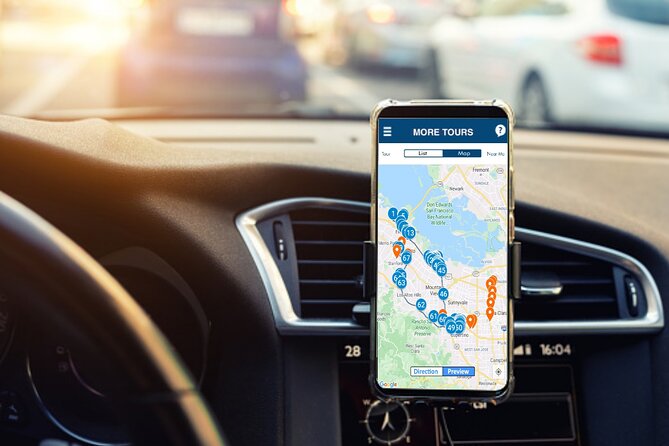
Plan on about 2 to 4 hours total. The route is long enough that you’ll want to treat it like a proper drive, not a quick “grab-and-go” loop.
The tour also works best when you follow the route and speed limit closely. Several stories trigger at specific points, and when your position timing drifts (for example, you take a shortcut or get slowed at a light), the audio can feel like it’s moving ahead of you.
If you like to stop for photos, you’ll want to be disciplined about when you pause. If you arrive at the next point sooner than the story expects, the audio can move on. Think of it as location-based chapters: great when you match the rhythm, frustrating when you get way off schedule.
Stop 1: Meta HQ (formerly Facebook) at MPK 16

This is your biggest “social media origin story” moment. You’ll circle the campus at MPK 16, learning how Facebook grew from its early days into the platform that reshaped how billions of people communicate.
What makes this stop more than a logo drive-by is the narration style: it covers both the rise of the company and the controversies that followed over the years. You’ll hear about Mark Zuckerberg’s unusual leadership style and how the business direction evolved.
A drawback to plan for: corporate campuses can feel like view-only from the outside. Even if the audio is great, you should assume you’ll mostly be seeing buildings and landscaping rather than going deep inside. If your goal is photos, bring time for quick pulls and be careful about where you park or stop.
Stop 2: Amazon Web Services at SJC18

From the outside, this stop can feel less flashy than you’d expect for an internet giant. The story helps you see why that matters: this building is tied to Amazon Web Services, the cloud engine behind a huge chunk of modern online life.
The narration focuses on how cloud computing supports Amazon’s dominance beyond shopping. It’s a good reminder that tech power isn’t only about apps you use—it’s also about the infrastructure you rarely see.
The main consideration here is attention span. If your group wants “product drama” and you’re more interested in systems, this stop will land well. If not, you might want to keep moving and save museum time for the deeper tech angle.






Stop 3: Google’s Android Lawn Statues
This is one of the fun stops, even if you’re not a hardcore Android person. The Google Android Lawn is filled with foam sculptures of sweets—lollipops, marshmallows, cupcakes—each tied to different Android software updates.
What I like about this kind of stop is that it’s playful but still informative. You get a quick, visual way to think about how updates build on each other and how branding can become part of tech identity.
Time-wise, you’ll probably want around 15 minutes. If you’re chasing photos, it can stretch a bit longer. If you’re trying to stay on schedule, stick to a quick walk-and-listen so you don’t rush the next stops.
Stop 4: Google B40 and the Googleplex experience

Here, the focus is the Googleplex and the origins of the search giant. You’ll get the story of how it was created and meet the braniac founders through the audio narrative.
There’s also a famous guiding line referenced in the narration: Don’t be evil. It’s a helpful thread to think about how tech companies talk about ethics, even while they grow into massive platforms.
Like other corporate stops, access may be limited. You’re learning mostly from the car and nearby viewing areas. The upside is you still get the “place meaning”—you’re not just reading a Wikipedia timeline. You’re hearing how the people behind the company framed the mission.
Stop 5: Microsoft’s California HQ

Microsoft is a must when you’re talking Silicon Valley tech, even if the company’s founding story isn’t purely local. The narration covers Bill Gates and Microsoft’s ongoing rivalry story, including its feud with Apple.
This stop is great for connecting dots. The story makes it easier to see how personal computing, software platforms, and the power struggle between ecosystems shaped what you use today.
Plan for about 10 minutes. It’s shorter on purpose, and that can be a good thing. You keep momentum. If you’re the kind of person who could spend an hour reading app history, you’ll probably still want to keep moving because the tour saves deeper attention for later.
Stop 6: The Computer History Museum (real artifacts time)
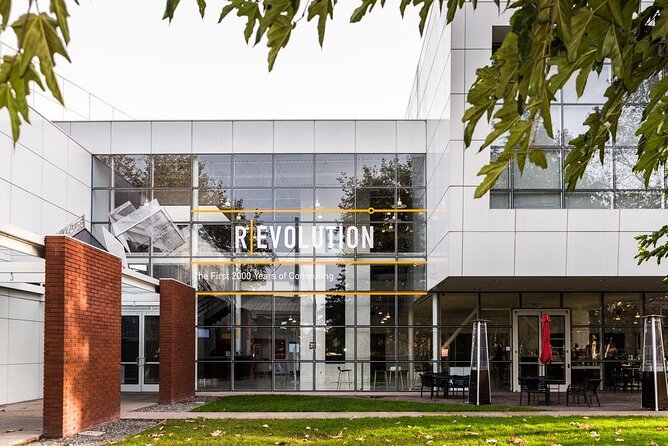
This is where the tour shifts from “HQ context” to “hands-on reality.” The Computer History Museum houses a huge collection of computing artifacts, with nearly 90,000 objects and photos, plus thousands of feet of cataloged documentation and hundreds of gigabytes of software.
If you’re a major techie, this is your payoff. You stop driving through campuses and get a chance to see real devices and the evolution of computing in a more tangible way.
You’ll only have about 10 minutes in this audio experience, so don’t expect a full museum day. Think of it as a taste that tells you whether you want to come back later for a longer visit. If you love hardware and timelines, you’ll probably walk away wanting more.
Stop 7: Apple Infinite Loop, the original campus drive
Apple has multiple campuses in Silicon Valley, and Infinite Loop is the original. The audio story frames how Apple became the global tech name you know today, and how the company continues to influence technology around the world.
This is a good stop for people who think Apple is just phones and laptops. You’ll hear how the culture and business strategy shaped what gets built—and how style becomes strategy.
The practical part: you may not be able to do much more than view and photograph from outside. The payoff is the story angle. You’re not just admiring architecture; you’re getting a narrative timeline in motion.
Stop 8: Apple Park Visitor Center for a real break
This is the stop where you’re most likely to feel like you actually left the car and did something. The Apple Park Visitor Center is set up for people who want to see what’s new, with a store and a cafe option for a snack.
Even if it’s near the route rather than perfectly inside the most traffic-friendly line, it’s often the highlight because it offers the easiest “walk-and-look” moment. In rainy conditions, this kind of stop can also save the day because you can step out without feeling stuck.
Time estimate here is about 30 minutes. Use it for a reset: quick photos, a store look, and a snack so you don’t burn the whole drive distracted by hunger.
If your group is picky about coverage—like missing a specific iconic building—this stop is the one that can help make the experience feel more complete in practice.
Stop 9: Tesla HQ and the Elon Musk storyline
The Tesla stop focuses on a building tied to Tesla headquarters, up through the end of 2021. You’ll hear the divisive leader storyline—Elon Musk—and how Tesla connects to other ventures like SpaceX.
This is a more polarizing chapter of tech history, and that can be a good thing. It keeps the tour from feeling like only one tone of corporate celebration. You come away with a clearer sense of how tech change can look at once visionary and messy.
You’ll spend about 10 minutes here. Like many other stops, you’re mostly in listening mode. If your group loves electric cars and space tech, this ending lands with energy.
Navigation, lane timing, and why a copilot can help
Self-guided driving audio is brilliant when everything clicks. It gets annoying when you’re hit with late instructions at intersections or when traffic forces you to reroute.
Here’s my honest practical advice: have one person focus on driving and another person handle directions. If you’re solo, consider using your phone’s map navigation in parallel. You’re allowed to do that, and it can help you avoid feeling insecure at crossings.
Also, keep an eye on timing. If you’re too fast from stop to stop or you cut corners, the audio can feel like it’s skipping ahead. On the flip side, if you’re slow, you might feel like you’re waiting for the next story trigger.
If you want the audio to stay synced, match the route and speed limit. It’s not about perfection. It’s about staying close enough that the location-based chapters make sense.
Tech requirements: phone, download, and car sound
To run the tour well, you need a compatible phone/tablet with GPS and cellular connectivity for setup. The tour works offline after download, so you’re not trapped by signal strength later.
For best experience, the tour recommends an iPhone with iOS 15 or later, or Android version 9 or later. For iPads/tablets, it needs a model with GPS chip support.
Sound setup is also part of the experience. If you connect the phone to your car’s audio system, you’ll hear narration clearly without blasting at your phone speaker. For walking around, headphones can help too.
If you’ve got a group device mismatch, don’t wait until you’re at the start point. Test the app and download while you still have decent service. That simple step can prevent a lot of frustration.
Who this tour is best for (and who should skip it)
You’ll likely love this tour if:
- Your group enjoys tech stories tied to places, not just dates
- You want an easy rainy-day plan that keeps everyone engaged
- You like freedom: start when you want, pause for photos, skip what you don’t care about
- You’d rather drive your own car than ride with strangers on a bus
You might not love it if:
- You hate navigation challenges or late turns and prefer guided tour schedules
- Your group expects full access inside corporate buildings (this is mostly outside viewing)
- You only want a museum experience and nothing else (because the museum stop is short)
If you’re the type who reads signs, listens carefully, and enjoys context, this tour can feel like a cheat code for understanding how these companies shaped modern life.
Should you book this Silicon Valley driving audio tour?
Book it if your group includes tech lovers and you want a fun way to see multiple HQs without spending a fortune. The per-car price, the lifetime access, and the fact that it works offline after download make it a practical choice. You’ll come away with stories that connect the companies, not just a list of logos.
Skip it if your priority is deep access to inside buildings, or if you already know the basic company timelines and want only museum-grade history. In that case, you might be better off spending more time at the Computer History Museum and doing a shorter, lighter drive.
If you want my simple decision rule: if you can handle following a planned route and you’re willing to download once on good Wi‑Fi, this is a solid, low-stress way to turn Silicon Valley driving into a real learning loop.
FAQ
How long is the Silicon Valley self-guided driving audio tour?
The tour typically takes about 2 to 4 hours to complete. It covers roughly 38 miles and includes 56+ audio stories.
What does the tour cost, and how many people can use it?
It costs $39.99 per group, up to 4 people. You purchase once per group/car, not per person.
Do I need cellular or Wi-Fi during the tour?
No. You must download the tour while you are on strong Wi‑Fi or cellular, and then it works offline afterward with offline maps.
Is the tour hands-free while driving?
Yes. Audio stories play automatically based on your location, and the experience is designed to be hands-free once you start the tour in the app.
Can I start and pause the tour whenever I want?
Yes. You can start anytime within the stated hours, pause anywhere, and resume later at your own pace.
Where does the tour start and end?
The start point is 1401 Marsh Rd, Menlo Park, CA 94025. The end point is Stanford Stadium, 625 Nelson Rd, Stanford, CA 94305.
Do I need tickets or reservations for the stops?
The tour does not include attraction passes, entry tickets, or reservations. The listed stops have free admission noted, but you should be prepared for outside viewing at corporate locations.